Personal Portfolio
My personal portfolio developed with Astro and TailwindCSS. Let's see why I chose this stack. In the meantime, enjoy the content I regularly publish in the blog section 😁.
Project Overview: Personal Portfolio
This portfolio is a personal project designed to showcase my work and share my IT knowledge. It highlights my projects with a clear presentation and includes a blog section for publishing technical and educational content.
Completed entirely independently, this project was a particularly enriching experience. It allowed me to assess my technical skills, strengthen my autonomy, and practice thorough project management, in this case for a full end-to-end web project.
One of the key aspects of this project was discovering and adopting a new technical stack and a new production deployment method. Using the Astro framework, along with deployment on Netlify, simplified implementation while allowing me to deepen essential concepts such as best practices, search engine optimization (SEO), and website performance optimization.
Requirements Specification
Functional Part
| Project Goals |
|---|
| Present my profile, skills, and projects professionally. |
| Centralize and share technical knowledge via a blog. |
| Provide an online support platform accessible to recruiters and potential collaborators. |
| Main Features |
|---|
| Home page presenting the portfolio and developer identity. |
| ”Projects” section detailing achievements (description, technologies, links). |
| ”Blog” section allowing the publication and consultation of technical articles. |
| Dark/Light Mode and multilingual support |
| Responsive design for desktop, tablet, and mobile screens. |
Technical Part
| Technologies Used | |
|---|---|
| Framework | Astro |
| Language | HTML, CSS, TypeScript |
| Deployment | Netlify |
The site architecture is fully based on static site generation (SSG), avoiding server-side rendering (SSR) or client-side rendering (CSR) whenever possible. For features requiring browser interaction, such as LocalStorage, sessions, or cookies, JavaScript is executed directly on the client side.
The site is optimized for maximum performance: fast loading times, lightweight images and resources, and static page generation. SEO is taken into account with semantic tags, complete metadata, and a logical content hierarchy. The code is structured to be readable and maintainable, facilitating future updates or improvements.
Deployment is done on Netlify with a simple and efficient workflow. Content or feature updates can be performed quickly without affecting the site structure. The architecture is designed to facilitate future evolution, addition of new pages or features, while maintaining simple and secure maintenance.
Lighthouse Audit
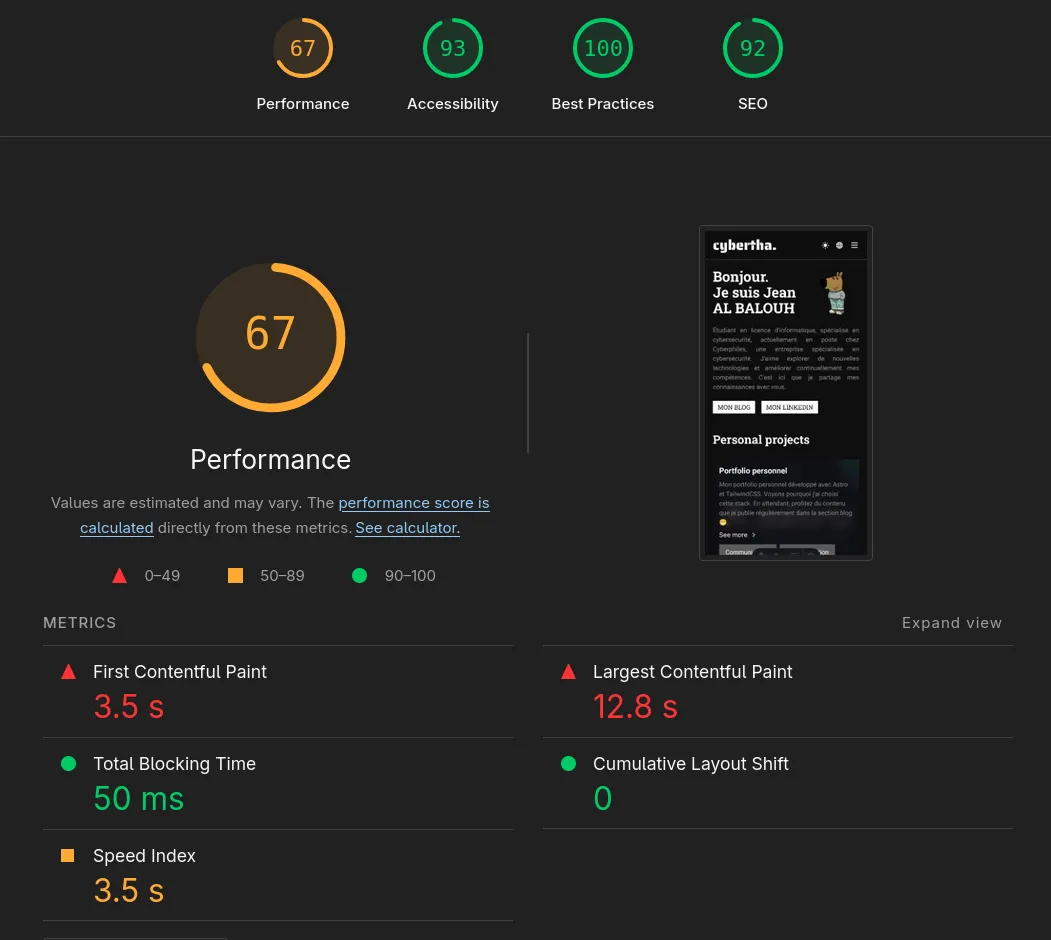
Audit performed on January 19, 2026: Google Lighthouse
Simplified Project Architecture
The project structure was generated with the following command
tree -L 3 -v -I "node_modules|dist" --dirsfirstThe project architecture provides an overview; some parts are hidden for security and clarity reasons.
├── public
│   ├── fonts
│   │   ├── Roboto.ttf
│   │   ├── RobotoCondensed.ttf
│   │   ├── RobotoFlex.ttf
│   │   ├── RobotoSlab.ttf
│   │   └── SairaStencilOneRegular.ttf
│   ├── js
│   │   ├── header.js
│   │   ├── language.js
│   │   ├── navigation.js
│   │   ├── search.js
│   │   └── theme.js
│   ├── favicon-16x16.svg
│   └── robots.txt
├── src
│   ├── assets
│   │   ├── blog
│   │   ├── projects
│   │   └── avatar.png
│   ├── components
│   │   ├── article
│   │   ├── icons
│   │   ├── project
│   │   ├── CategoryAside.astro
│   │   ├── LanguageModal.astro
│   │   ├── OverlayBlur.astro
│   │   ├── SearchAside.astro
│   │   └── TagAside.astro
│   ├── config
│   ├── content
│   │   ├── blog
│   │   ├── categories
│   │   ├── projects
│   │   └── config.ts
│   ├── i18n
│   │   ├── ui.ts
│   │   └── utils.ts
│   ├── layouts
│   │   ├── footers
│   │   ├── headers
│   │   └── BaseLayout.astro
│   ├── pages
│   │   └── [lang]
│   └── styles
│       └── global.css
├── PROJECTS.md
├── README.md
├── astro.config.mjs
├── chart.blog.mdx
├── package-lock.json
├── package.json
└── tsconfig.json